
Getting started
From nothing installed to a run you can read back, in five steps. No concept is assumed; each one is named as it turns up and linked to Concepts, where it is explained properly.
What you need
- Python 3.12 or newer.
- At least one supported backend: a coding agent CLI on your
PATH, already logged in, such asclaude(Claude Code),codex,kimi,qwen(Qwen Code) orgrok(Grok Build) oragy(Antigravity CLI); or the optional DeepSeek Harness Python SDK with a DeepSeek API key configured. - A project directory you are willing to have rewritten. Read Security first — humanize runs every agent with permission prompts disabled, so an agent under it edits files without asking.
Check what you have:
command -v agy claude codex grok kimi pi qwen opencode mimoFor DeepSeek Harness instead, install the dsh extra and check that its SDK imports:
pip install 'hmz[dsh] @ git+https://github.com/humanfia/humanize2.git'
python -c 'import deepseek_harness; print("dsh installed")'
With an isolated uv tool, install the extra into that tool instead:
uv tool install 'hmz[dsh] @ git+https://github.com/humanfia/humanize2.git'If the tool is already installed without DeepSeek, add --force to that command. The dsh tab in /agents also shows an environment-specific command until the SDK is present.
DeepSeek Harness uses API-key login only. To configure it with DeepSeek's own UI, install its launcher (Node.js is required), start it, and open the URL it prints:
npm install --global @deepseek-ai/dsh
dsh web
You can run npx @deepseek-ai/dsh web instead of installing the launcher globally. Open Settings -> Models, enter the DeepSeek API key, and save. After reopening hmz, type /agents, switch to dsh, and choose as installed; humanize then uses the credentials and base URL already saved by dsh.
Alternatively, press ctrl+n on the dsh tab, choose key, and enter an account name and the key. Or set it only for the process that starts humanize:
export DEEPSEEK_API_KEY=sk-…
hmz
Nothing else is required. Isolation wants docker, and remote execution wants Linux on x86-64 here plus python3 on the far machine — neither is needed for anything below.
Install
pip install git+https://github.com/humanfia/humanize2.gitUse the hmz[dsh] installation above when DeepSeek Harness is the backend you want.
Or, from a checkout with uv:
git clone https://github.com/humanfia/humanize2.git
cd humanize2
uv sync
Either way the command is hmz:
hmz --version1. Open the prompt
Change into a project you want work done in, and run hmz with nothing after it:
cd ~/code/myproject
hmz
That is the only way into the terminal interface — there is no hmz tui. You get a transcript, an editor under it, and a status line under that.
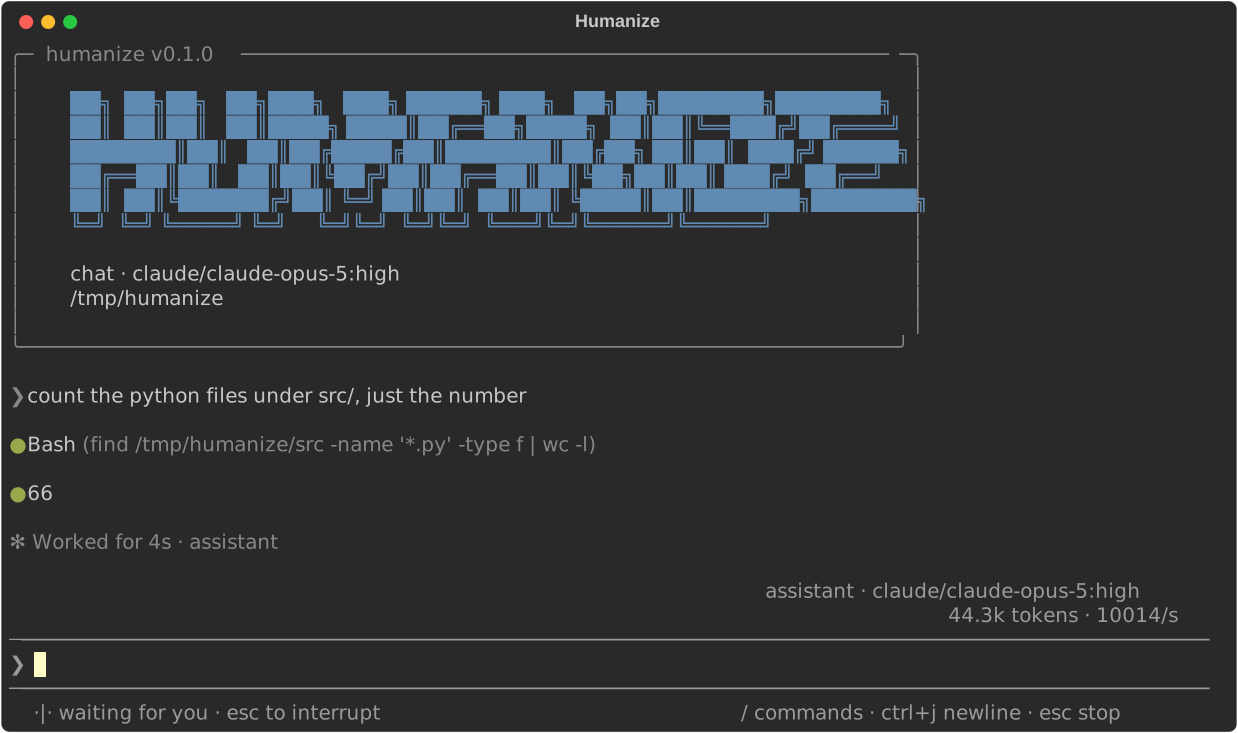
The line above the editor says what you are about to talk to, as cli/model:effort — the CLI that will run the turn, the model it will ask for, and how hard it should think. The first time, it opens on the first backend installed here that has said what it runs, at the first model it named — that CLI's own idea of what it runs by default — and at high — deliberately not the hardest setting, which is the one to reach for rather than the one to spend before anybody has asked for anything. After that it opens on whatever this project was last set up to run.
The status line's right-hand end lists the keys that do something right now, and nothing else. It is the whole of what you have to remember.
2. Say something
Type a line and press enter:
Read README.md and tell me what this project is.The agent takes a turn — one exchange with the model, which may run tools and may take minutes. What it says arrives as it says it. Underneath, humanize is running the flow called chat: one agent, one session, and every line you type is another turn of that same conversation.
Three things worth trying while it is running:
- Type another line and press enter. It goes into the turn already running rather than starting a new one. If no turn is open, it is held for the next.
/detailstoggles whether tool calls and thinking are shown, or only what the agent says.- esc stops the flow. ctrl+c clears what you have half-typed, and ends the turn on the screen when there is nothing half-typed.
/exitleaves.
Type / and the commands appear under the editor with a line about each. Tab takes the one highlighted. The full list is in the TUI reference.
3. Put a loop under it
Talking to one agent is not the shape of most work. A flow is what you reach for once it is not: a Python file that drives one or more agents in a loop.
Type /flow to pick one by name. Try ralph_loop — a fresh session every turn, so the agent starts from the task and the repository each time with nothing of the last turn in context:
/flow ralph_loopThen say what you want done. It will keep going until you stop it with esc — that is what a Ralph loop is. /status shows who is working, who handed to whom, and what it has cost.
humanize ships three — chat, ralph_loop and stateful_ralph — and offers the rest from a flowverse, which is a git repository of flows. official is there from the start: press left and right in /flow to walk between the places flows come from, and ctrl+r on one to fetch it. Every flow is described in Flows.
4. Run one without the interface
The same flows run unattended:
hmz exec -f ralph_loop -a claude/claude-opus-4-8:high "fix the failing tests"-fis the flow, by name or by path.-ais one agent, writtencli/model:effort. Repeat it once for each agent the flow drives, in the order the flow takes them —official/rlardrives two, so it takes two-a.- The last argument is the task.
DeepSeek Harness uses the same agent spelling. With dsh's saved configuration, no environment prefix is needed:
hmz exec -f ralph_loop \
    -a dsh/deepseek-v4-flash:high "fix the failing tests"
With the environment setup above instead:
DEEPSEEK_API_KEY=sk-… hmz exec -f ralph_loop \
    -a dsh/deepseek-v4-flash:high "fix the failing tests"
It also offers deepseek-v4-pro and the efforts max, high and off. Its current preview SDK only supports the default permission=bypass and skills=None; see Agents › What each backend can do.
With a key account called deepseek instead, name that account after @:
hmz exec -f chat -a dsh@deepseek/deepseek-v4-flash:high "hello"To narrow what one of those agents may do, use the written-out form and name one of the four permission rungs:
hmz exec -f ralph_loop \
    -a cli=codex,model=gpt-5.6-sol,effort=high,permission=read-only \
    "review this repository"
Nobody is at a prompt here, so an agent that stops to ask a question is told nobody answered and carries on rather than waiting forever.
If you get the count wrong, it is refused before any agent runs:
$ hmz exec -f official/rlar -a claude/claude-opus-4-8:high "fix the build"
hmz exec: error: official/rlar: the flow drives 2 agents, 1 given
5. Read the run back
Every run writes down what it was — the flow, the agents, and the id of every session they opened. Turn that plus the backends' own transcripts into one timeline:
hmz collect.humanize/20260809T014455Z.trace.json: 3 sessions, 412 slicesOpen that file in ui.perfetto.dev (drag it in) or chrome://tracing. Each agent is a process, each session a track, and each slice one thing the agent did — with the prompt, the reasoning, the tool input and the tool output attached to it. It is the only view of a long run that fits on a screen.
Write a flow of your own
A flow is a Python file with a function marked @flow in it, taking the agents and the task. Put this in .humanize/flows/twice.py:
"""Two passes: do the work, then read it back and fix what is wrong."""

from hmz.agents import AgentBase
from hmz.flows import flow

@flow
def run(agents: tuple[AgentBase], task: str) -> None:
    (agent,) = agents
    session = agent.new()
    session(task)
    session("Now review what you just did, and fix anything that is wrong.")
The tuple[AgentBase] is not decoration: its length is how many agents the flow drives, and it is the one thing a command line starting the flow cannot otherwise know. Write async def run instead, and the flow can wait for several turns at once. Run it by name:
hmz exec -f twice -a claude/claude-opus-4-8:high "add a --dry-run flag"It is offered in the interface too — /flow lists the flows in .humanize/flows here, in ~/.humanize/flows, the ones humanize ships, and everything in every flowverse fetched here, a tab apiece.
Where to go next
- The words used above, properly: Concepts.
- Every key and
/command: TUI reference. - Every flag: CLI reference.
- Flows that do more than the above: Flows.
- The Python API behind
agent(...)andsession(...): Agents. - Running the work on another machine or in a container: Machines.